
Notices and notifications
The notices panel that appears when Field Manager opens, where it is shown depending on how the application was started, which notices it can bring and the system notifications.
Notices and notifications
The start-up notices panel
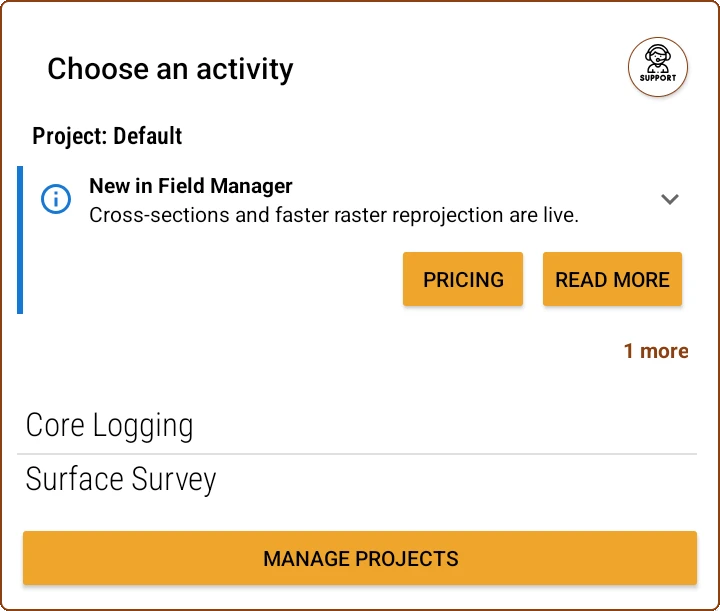
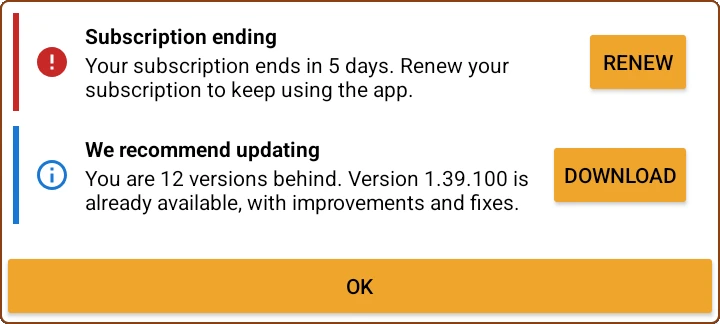
When you open Field Manager a notices panel may appear, with one card per notice: a colour bar and an icon according to severity, a summary, a detail that can be expanded and, in some cases, an action button. If there is a single notice it looks like a plain message; if there are several, up to 3 are stacked and a button appears to see the remaining ones. The panel is shown only once per start-up.
The panel appears in one of two places, depending on how the application was opened. If start-up reaches the main menu, the cards are shown inside that same window, between the project name and the list of activities. If instead the application was opened with a shortcut straight to an activity, or the system restored it, the panel appears as a window of its own on top of the screen. They are the same notices in both cases.
Which notices it can show
- The license is about to expire or has already expired. The notice carries the button to renew from the web portal (see Install and activate).
- Messages sent by the server, with news or notices from the Field Manager team.
- Errors logged during the previous start-up: what they mean and what to do is in Troubleshooting.
- The device has fallen several versions behind the latest available one, with the option to download the update.
- Field Manager has just updated itself, so that closing and reopening the application doesn't look like a failure.
- Android stopped an update download because the application was in the background.
System notifications
Besides the panel, Field Manager uses Android notifications. Low-level server messages arrive as a notification in a channel of its own called "News", separate from urgent notifications, so they can be silenced without losing the important notices.
You've read enough. Try it with your own project.
20 days free, with your data. If you get stuck: the manual — and us.
Secure payment with Stripe · Cancel anytime.